Editor's Review
Are you in search of an entertaining and engaging word game to enjoy with your friends and family? Your quest ends here with Words With Friends! This widely-loved mobile game presents various opportunities to challenge your vocabulary skills and compete against others. Whether you enjoy quick games or prefer enhancing your skills offline, Words With Friends caters to all preferences. With features like weekly challenges, word radar, and customizable profile frames, you can tailor your gaming experience and showcase your individuality. Connect with players globally and enjoy gameplay in multiple languages. So, what are you waiting for? Download Words With Friends now and may the best player win!
How To Play?
- Participate in the weekly challenge and earn exciting themed badges
- Challenge friends to race against the clock in speed play
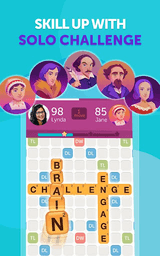
- Hone your skills through solo gaming
- Discover the ideal word you could have played with retrospective insights
- Leverage the word radar to unveil all potential moves
- Personalize your profile with distinctive frames
- Connect with players who match your skill level
- Select from six different languages for gameplay
Frequently Asked Questions
Is Words With Friends Crosswords free to download?
Yes. Words With Friends Crosswords is free to download from the official Google Play Store and Apple App Store.
Is it safe to download Words With Friends Crosswords from PogooGames?
PogooGames does not host or distribute any APK, IPA, or installer files. The download buttons on this page link directly to the official Google Play Store and Apple App Store listing for Words With Friends Crosswords, so you always install from a verified source.
What device do I need to play Words With Friends Crosswords?
Words With Friends Crosswords runs on Android, with an install size of around 27 M+. Check the official store listing for the exact minimum OS version required.
How do I install Words With Friends Crosswords?
Tap the Google Play or App Store button on this page, then tap Install (or Get) on the official store page. PogooGames never asks you to download a file directly — installation always happens through the official store.
Screenshots




Ratings
4.2
★★★★☆